

In the first article, we introduced what NotifyWorld is. The second article explained some of the use cases, scenarios and edge cases. The third article described the solution architecture that is powering NotifyWorld.
In this final article we will talk about security that is implemented in the NotifyWorld. We’ll also look at some of the attacks we already experienced and how we handle source code and deployments.
Fun fact: I was able to run Claude Fable 5 (defensive security audit) on the full code just before it was switched off by the US government. There were no high or medium secerity security findings reported by Claude. There were a few low severity findings which are not really an issue since Claude doesn’t have the full picture if the development process. Example: development database should not be publicly accessible. That is intentionally made publicly accessible so that developers can access it through their local IDE’s.
When it comes to security, we distinguish between two types of possible threats:
- external threats
- internal threats
Protection against EXTERNAL threats
By external threats we assume Hackers and AWS operators. Hackers who intentionally want to get your login credentials and access to you documents, AWS operators who accidentally get exposed to the sensitive information.
We believe we have a sufficient level of protection for both of these types of external threats.
- How is password managed?
In NotifyWorld passwords have dual purpose. One is to enable a user to login to the system and other one is to encrypt user’s documents.
Let’s examine the login process.
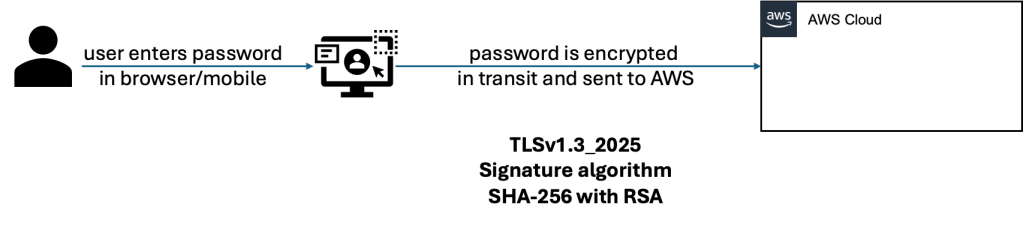
From the moment a user enters password, it is encrypted and sent over to AWS cloud using TLSv1.3_2025 post-quantum encryption protocol.
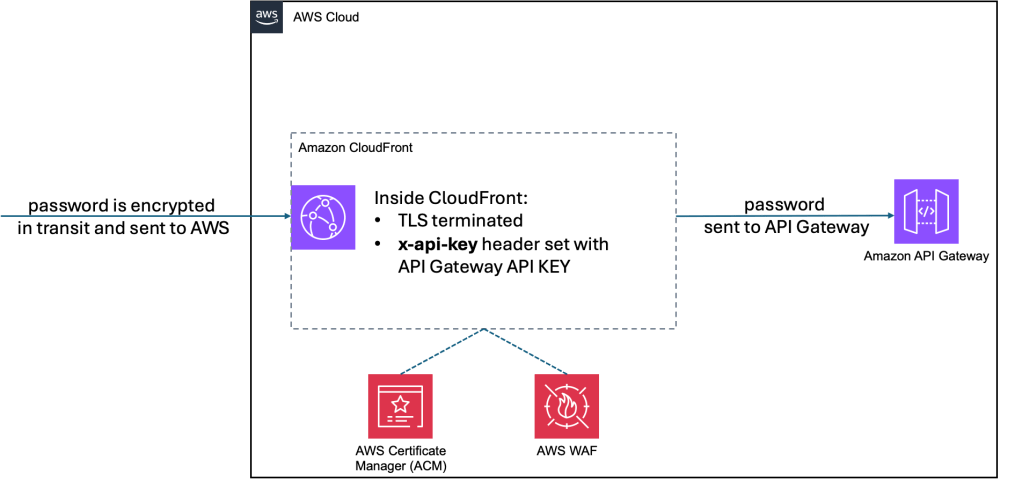
Once it reaches AWS cloud, the request needs to pass CloudFront first. If the request is not filtered by WAF (in case of malicious requests), then CloudFront proceeds with terminating TLS and expanding the request header with x-api-key where API Gateway key gets stored. Any request without this key will be rejected by API Gateway. The request with the password is then further sent to API Gateway for dispatching to the appropriate lambda function.
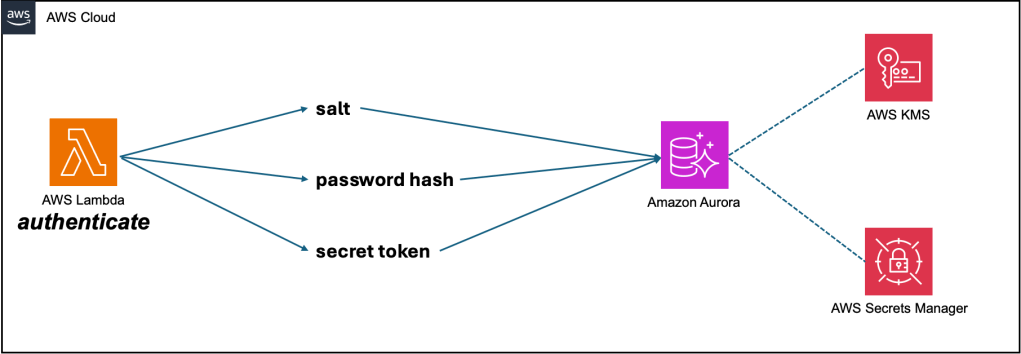
Lambda function named authenticate is the one that receives the request with password inside. That lambda does several things:
- Generates a salt number. In cryptography, a salt is random data added to a password or piece of data before it is run through a hashing function. Its primary purpose is to defend against pre-computed hacking attacks (like rainbow tables) and ensure that identical passwords yield completely unique and unpredictable hashes.
- Creates a hash value out of password and salt.
- Generates a random secret value using the same password and salt. This secret value is what we use to encrypt all user’s documents. This value is encrypted using user’s password and that creates a secret_token that we store in our database. Secret token on it’s own, without the password, is worthless.
We use bcrypt for generating secure password hashing. It protects against brute-force and rainbow table attacks by automatically generating and incorporating a random salt into the hash.
For random secret value we use Fernet. Fernet is a symmetric encryption system in Python’s pyca/cryptography library that guarantees messages cannot be read or altered without the key. It utilizes AES-128 in CBC mode and PKCS7 padding, combined with SHA256 HMAC for authentication.
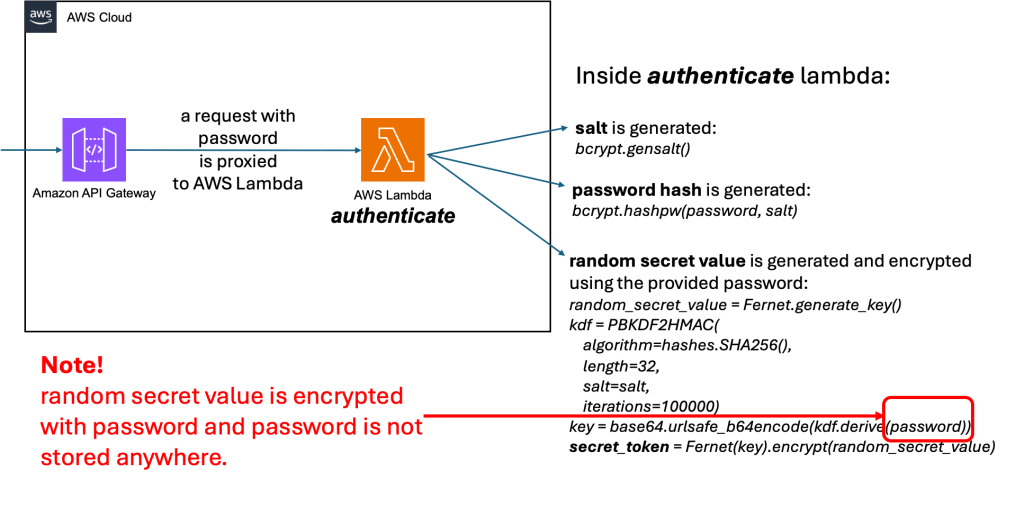
These 3 values are then stored in our databases: salt, password hash and secret_token. Database itself is further encrypted using KMS (Key Management Service) with customer managed keys. Database credentials are stored in the Secret Manager.
Password hash is used only to enable user login in the system. We don’t store password anywhere, we just make a hash out of it. Each time a user wants to login, he provides a password, we make a hash out of it using the same salt as before and compare the newly created password hash with the one stored in the database. If they are the same, we let the user in the application.
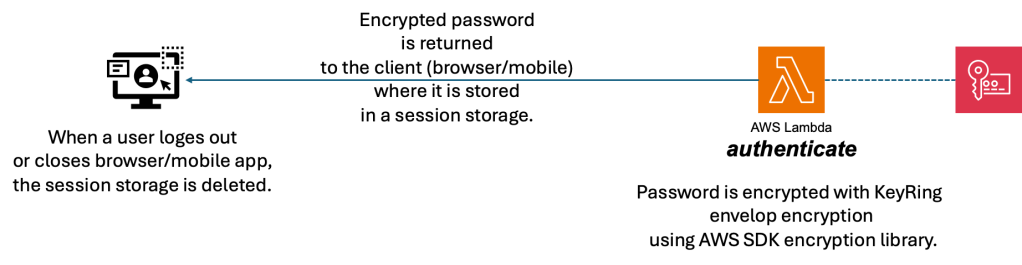
As a response to the user, this authenticate lambda function returns the password back to the user but now additionally encrypted with AWS KMS KeyRing envelop encryption. Using an AWS KMS keyring for encryption is highly secure. It provides enterprise-grade protection by leveraging hardware-based key generation, centralized access control, and envelope encryption. It meets strict security standards (such as FIPS 140-2 Level 3) and ensures that root keys never leave the security boundaries.
But why do we return the encrypted password back to the user?
Every time a user wants to upload/download/read/write/modify documents in Notify.World, the user needs to provide a password so that we can decrypt random secret value.
It would be annoying (bad UX) to ask user to enter password each time, so instead we pass encrypted password from the browser/mobile to a lambda where we decrypt that password with KeyRing/KMS and then with that plain password we can decrypt random secret value.
The encrypted password lives inside a user’s device (web browser or a mobile) only during the session duration. After that it is removed.
What if a password is forgotten?
This is where the concept of trusted contacts kicks in, to help you restore access to the random secret value.
Check out Forgotten Passwords and Death Confirmation Scenarios in the second article we wrote about this topic:
- How are documents managed?
Documents are at the heart of NotifyWorld application. They are the most important piece and contain highly sensitive information. That is why they require a special treatment.
Uploading of a document:
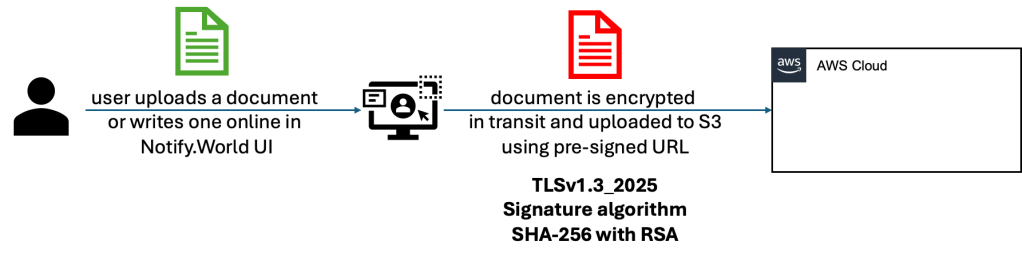
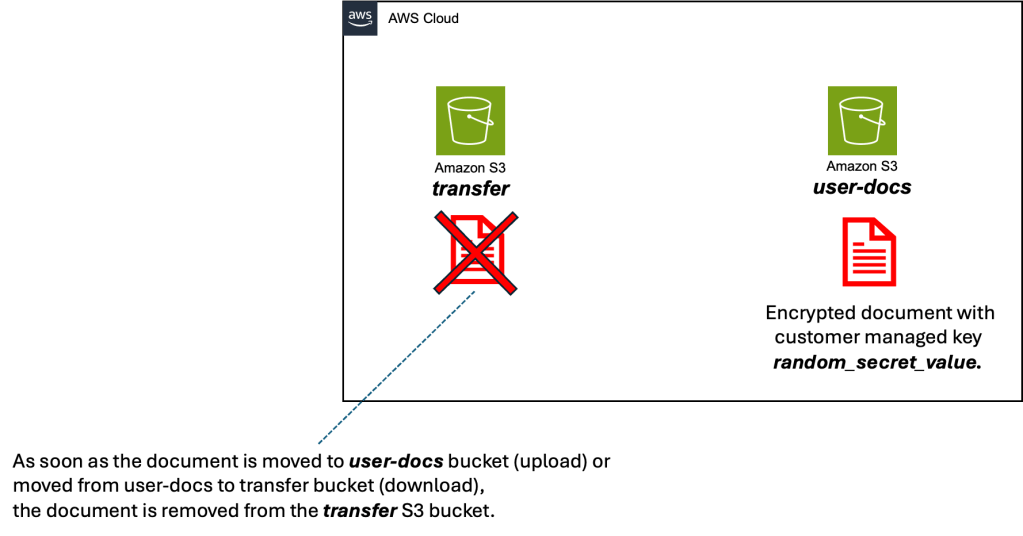
Users receives a pre-signed URL for an S3 bucket where the document is uploaded to. This is just a transfer bucket. Document doesn’t stay there. We use S3 transfer acceleration to speed up uploading of the documents.
From there, we move the document to the user’s S3 bucket and in that transfer we encrypt it with user’s random_secret_value that we generated before. That is done using S3 server-side encryption with customer-provided keys (SSE-C).
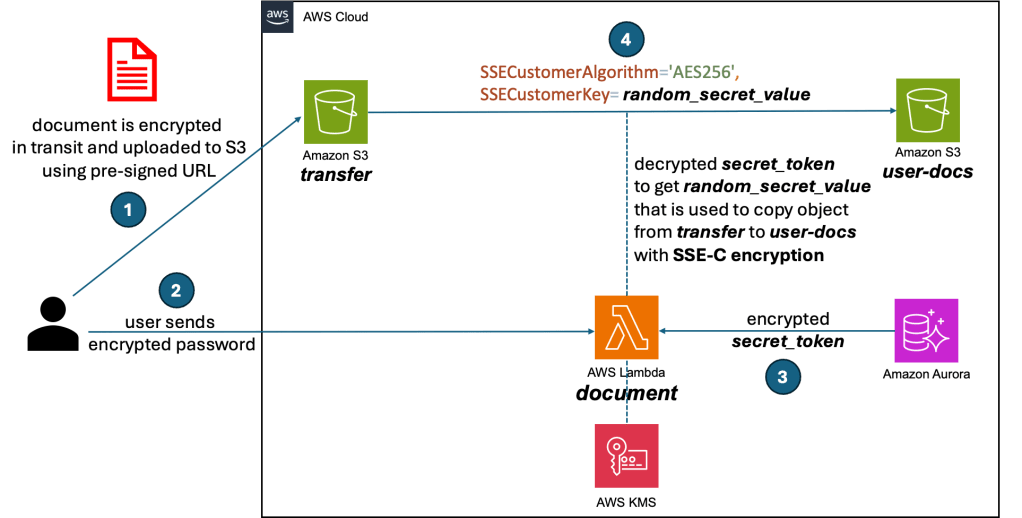
When a user wants to read a document, the reverse process is happening. The document is moved to the transfer bucket and decrypted along the way. The user receives a new pre-signed URL to be able to download the document.
Document Download:
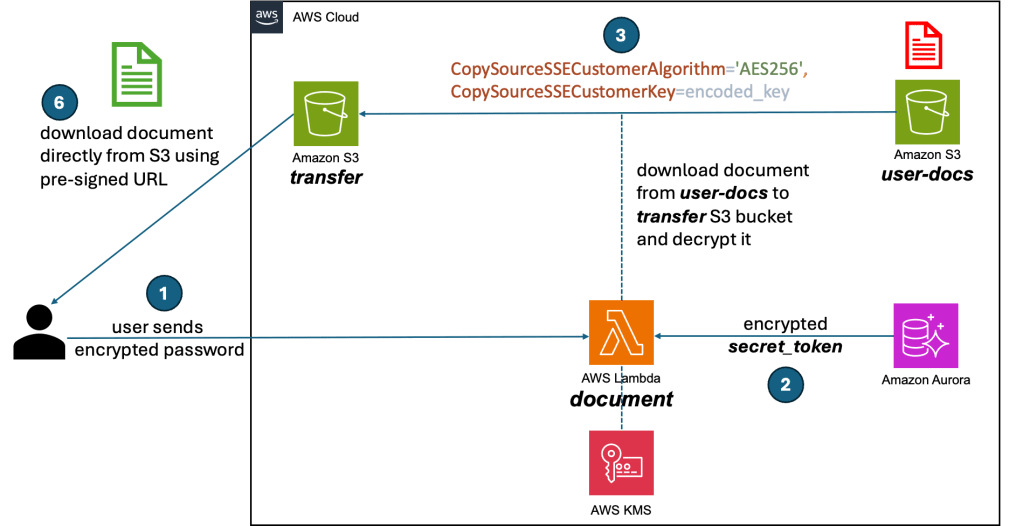
In both cases (upload and download) the document stays only in the user-docs bucket. Document form the transfer bucket is removed the moment it gets uploaded/downloaded.
Protection against INTERNAL threats
Internal threats are NotifyWorld employees that are:
- managing AWS environment
- developers that have access to the source code
Before we discuss possible internal threats, it is important to understand how we organized AWS account structure:
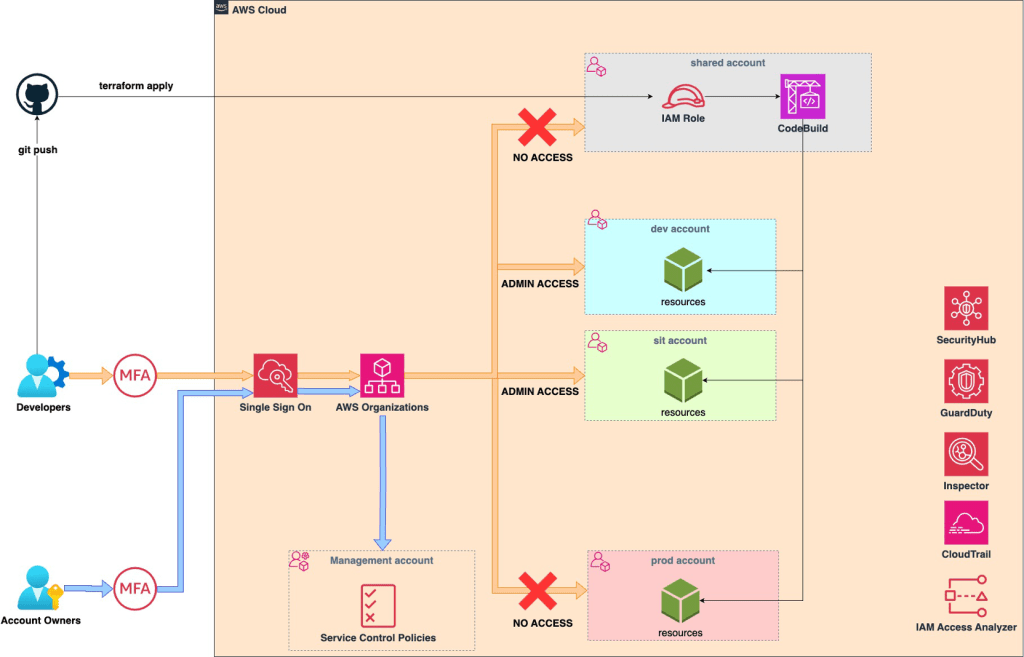
Root account is protected by hardware MFA (stored in a safe deposit box in a bank) and has 60 characters password that is split in 3 parts (20 characters each) and distributed among 3 people => 4 people need to get together to login as root.
No user has access to PROD account. No user has access to SHARED account. These accounts are managed by Terraform and no human needs to have access to these accounts.
Additional set of SCP’s (Service Control Policies) are established on the root account to further restrict access to PROD account.
All account wide activities are strictly controlled via Security Hub, Guard Duty, Amazon Inspector, IAM Access Analyzer and CloudTrail.
AWS environment is well protected, but what about when we look more to the left -> source code and deployments?
Deployment Protection
- Lambda functions and layers are signed with AWS Signer prior to being deployed. With AWS Signer we cryptographically sign deployment ZIP files so that we can enforce trusted and uncompromised execution. Signer acts as a secure chain-of-trust, verifying that our deployed code is unaltered and comes from a trusted publisher before it ever executes.
- Each deployment to PROD requires approval of 3 people. Merge request is verified by 2 persons other than the developer who made committed the code and the MR approval is then obtained by a third person.
Source Code Protection
- Access to source code repos is strictly controlled.
- All devs must have MFA.
- All devs must have GPG configured. All commits are signed locally, which gives confidence about the origin of a changes made.
- Repos have code owners, who are automatically requested for review when someone opens a pull request that modifies code that they own.
Conclusion
We have put a lot of effort in creating an ultra secure platform where you can upload your documents knowing that nobody can access them except you and the contacts you shared those documents with.


