

In the first article, we introduced what NotifyWorld is. If you haven’t read it yet, here is the link: https://konem.blog/2026/06/03/notify-world/. The second article explained some of the use cases, scenarios and edge cases. You can read it here: https://konem.blog/2026/06/10/notifyworld-part-2-use-cases-and-scenarios/
There are few more parts to cover. In this article we will talk about solution architecture that is behind NotifyWorld. There will be some more follow up articles coming soon, so stay tuned for more:
- Part 4: Security and Attacks
- Part 5: Coding and Deployment
Solution Architecture
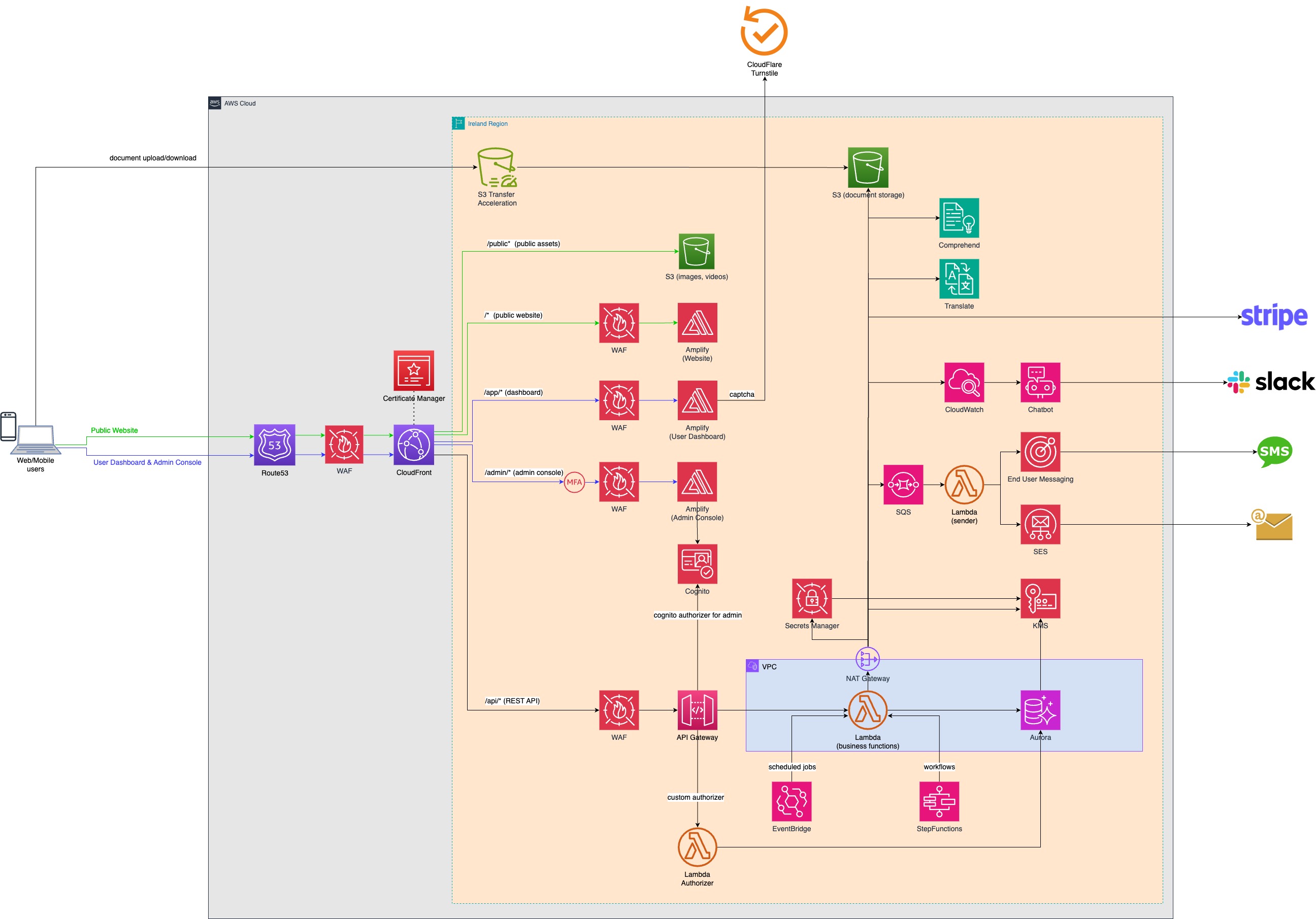
Here is the high level solution architecture of NotifyWorld:
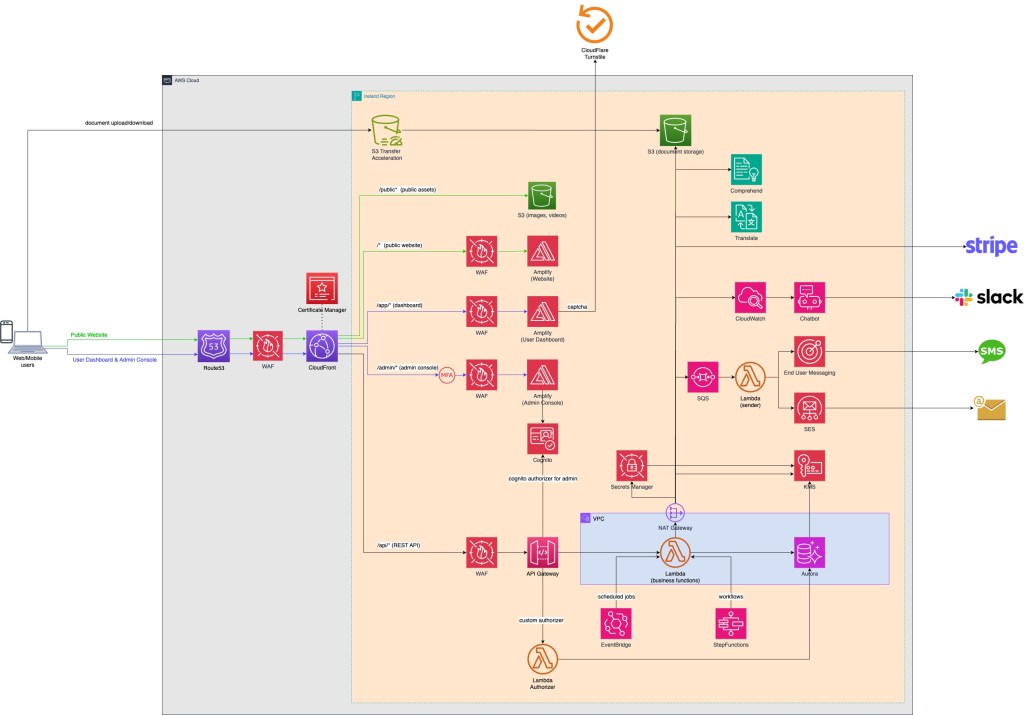
You can also download the image and zoom it in if needed:
Might look complicated and busy at the first sight, but we will dissect it and explain piece by piece…
NotifyWorld is an application running on AWS. We developed the application using exclusively AWS native and managed services (also known as serverless services). It was very important to reduce reliance to self-managed resources to absolute zero. We were a two-man development team (one frontend and one backend/infra developer). We didn’t want to have a large DevOps team just to keep the lights on. Our experience from previous projects we did on AWS gave us enough confidence to rely exclusively on the fully managed services. They scale well, they are reliable, resilient and most importantly – they cost less.
There are a lot articles about cloud services being super expensive, “a trap” that sucks your budget over night. That is all FUD in my view. If you don’t know what you are doing, it will be expensive no matter what technology you choose. Learn the services, read manuals, apply best practices, get some experience in building apps with those services and I guarantee you it will be less expensive than anything you manage yourself.
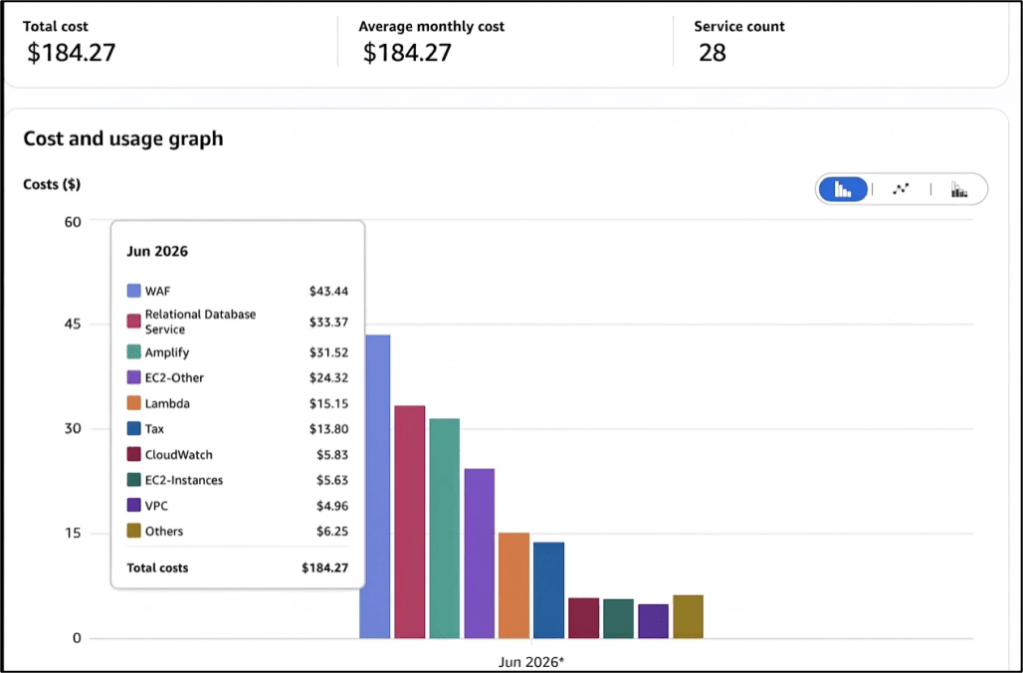
Here is the cost overview for June. June is not over yet but based on previous months the end bill should be around $220.
There are about 40 users per day, making approx. 15 requests per second in the peak usage time. Not much you might say, however the presented architecture can scale to whatever usage level you throw at it and the billing thresholds are still way below the levels where it starts making a significant difference.
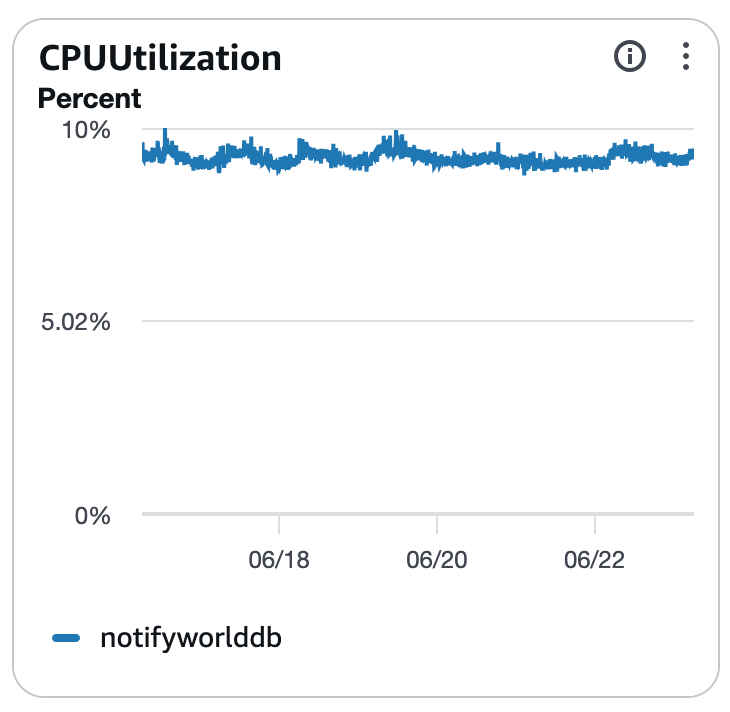
For example, let’s look at our database, which is PostgreSQL v17.7, running on Aurora Serverless v2 cluster. CPU utilization is below 10% and Aurora Serverless will start scaling automatically out when the load becomes higher.
Let’s get back to the cost of our application. The database cost is fixed at $83 per month, as long as the cluster stays as-is. In case there is a higher load, when the database adds one more instance automatically then we will see the cost increase here depending on the duration of the increased load. After the load goes down, Aurora scales back down as well.
Note: we have a Savings Plans for Database Usage that is on the master account, that costs $50.69 per month. That is why you don’t see the full database cost on the chart above. Having savings plan helps us reduce the monthly billing by receiving additional discounts from AWS.
The biggest cost factor is not our business logic or the database itself, but the protection. To be precise, WAF (Web Application Firewall) .
WAF charges are around $90 per month.
We’ll talk more about the security in the next article, but just to leave this one here. In the last week, WAF has blocked 24.610 requests that are coming from bots, bad IP reputation lists, some DDoS attempts and so on. Definitely worth the money.
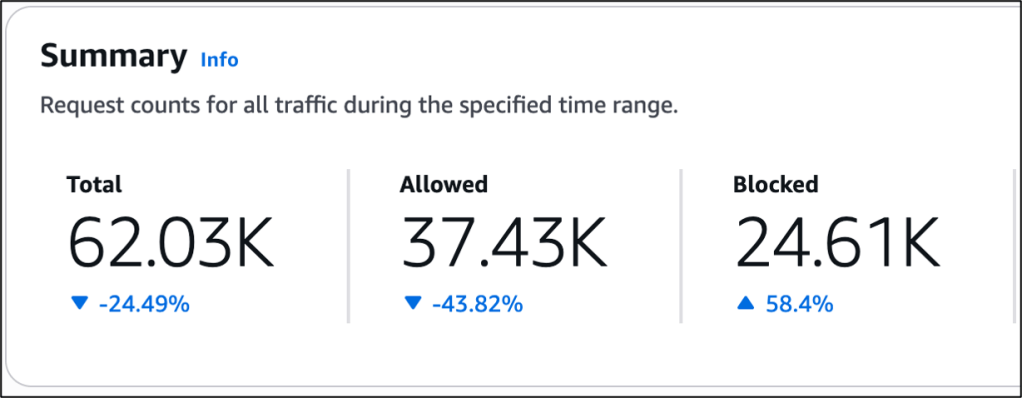
To summarize, we are paying $220 + $50 (savings plan) = $270 per month for a production application of a fairly complex size and the architecture that can quite easily meet requirements of many enterprises/startups out there.
Now let’s dive deeper into the architecture itself…
The Front Door
NotifyWorld application has 2 types of user interfaces. One is a web browser interface and the other one is a native mobile application interface (Android/iOS). Both interfaces are communicating with the backend over the single front door entrance – CloudFront.
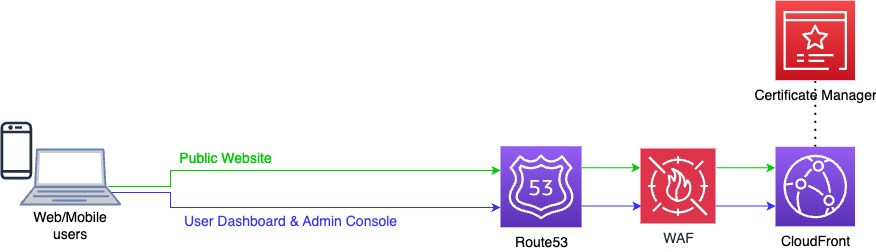
CloudFront is an excellent service as it provides several benefits out of the box:
- CloudFront acts as a TLS termination point. All HTTPS communication is being terminated at the CloudFront point. We are using TLSv1.3_2025 which is a security policy introduced by AWS that incorporates hybrid post-quantum key establishment, protecting edge connections against potential future quantum computing threats.
Post-quantum encryption (PQC) involves new public-key algorithms designed to resist decryption by powerful quantum computers. It secures classical networks against “harvest now, decrypt later” threats without requiring quantum hardware. - CloudFront integrates directly with Certificate Manager where we keep our “notify.world” certificate generated with “SHA-256 with RSA” signing algorithm.
- Cloud Front integrates with WAF where we get DDoS protection for layer 7 attacks (layer 3 and 4 attacks are already provided by default by AWS Shield), bot control, fraud prevention and many more.
Route53 as a DNS server is routing all requests to CloudFront and from there CloudFront is dispatching traffic to the different backend endpoints.
Public Endpoints
After CloudFront, we have several endpoints that can receive dispatched requests.
- S3, where publicly viewable images and videos are stored. This S3 bucket is protected by a bucket policy to allow reading of the objects only by the CloudFront.
- Amplify (Website), where the public https://notify.world website is hosted. It has a set of WEB protection rules on the associated WAF to defend the website from DDoS attacks.
- Amplify (User Dashboard), where the application dashboard is hosted. We have several protection mechanisms here. WAF for standard WEB protection, username/password with email code verification and finally a captcha. We use Turnstile captcha from CloudFlare.
- Amplify (Admin Console), where the application administration is hosted. Here we also have several protection mechanisms. MFA (phone authenticator) for a second factor authentication, WAF for standard WEB protection and username/password.
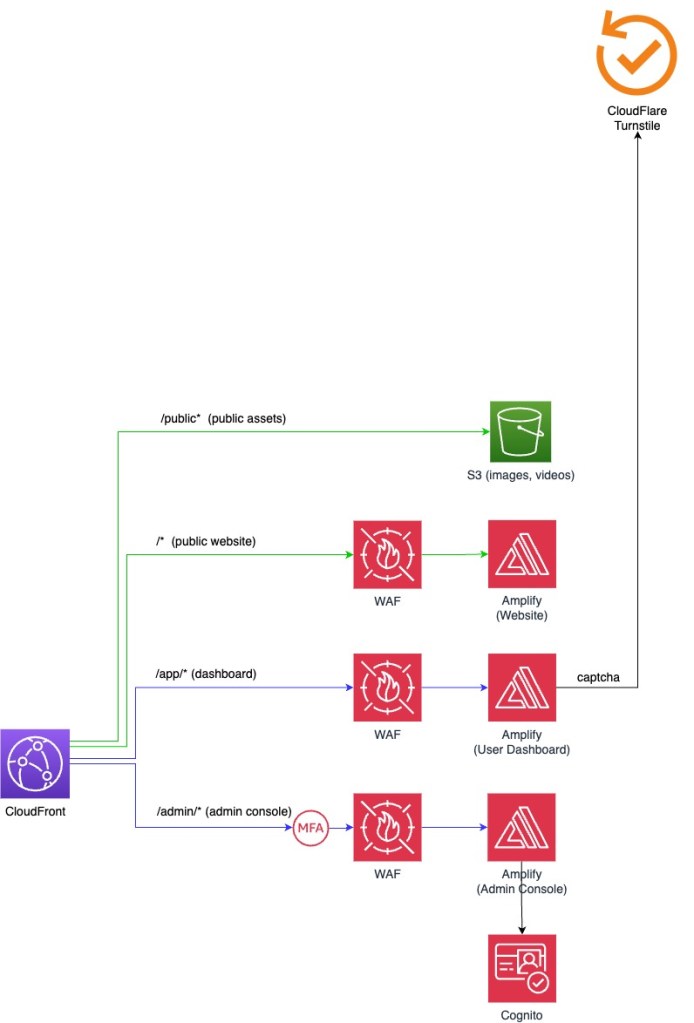
It’s important to note that these are all public endpoints by default. You can’t make them private. Every Amplify distribution will have some URL like: https://prod.dxgsga7t08738h67.amplifyapp.com. This is a publicly listed domain on a DNS server somewhere. There are plenty of bots that are scanning public DNS records (using tools like https://search.dnslytics.com/) and making attempts to access them. It is important that each public endpoint is properly protected.
REST APIs
There is one more public endpoint that we separated from the previous. It is API Gateway. This is where access to our backend API’s is configured.
API Gateway has several layers of protection:
- API Key: known only between CloudFront and API Gateway. No request can bypass CloudFront without having this key.
- WAF: with special API rules to prevent malicious API attacks.
- Usage Plans: there is a limit on how many requests per seconds can be made before throttling mechanism is kicked in. If requests exceed our predefined rate and burst limits, the gateway automatically rejects them with an HTTP
429 Too Many Requestserror.
- Authorizers: each request needs to have a valid JWT (JSON Web Token) to be able to pass the gateway and go to the backend functions. For the Admin app, this token is verified by Cognito. For the User Dashboard app this token is verified by a custom lambda authorizer that for each user checks the validity of the JWT and the user role in the application.
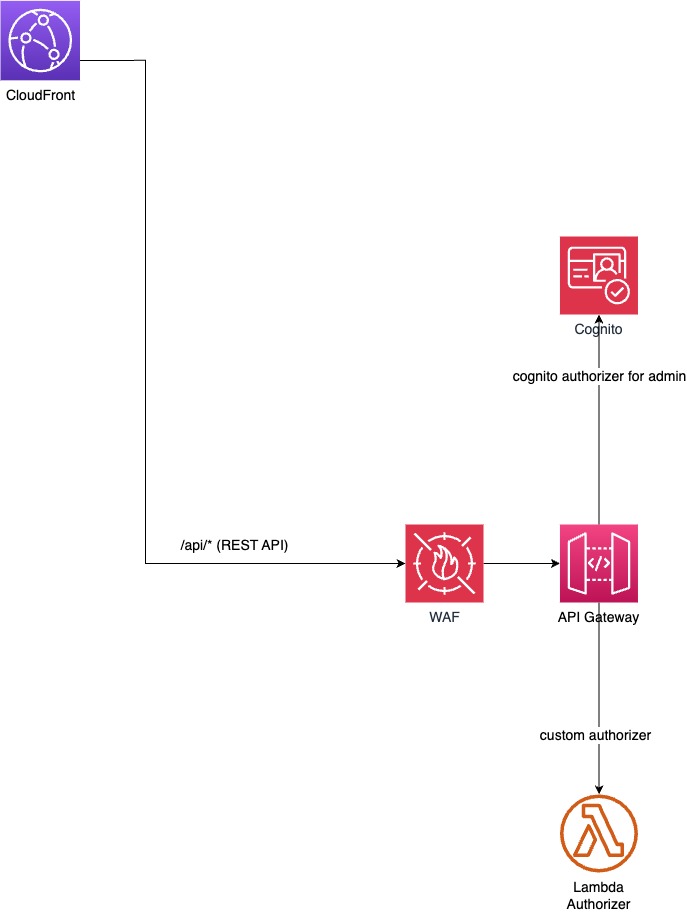
If all is good, the request can proceed to one of the backend lambda functions where the business logic resides.
Business Logic
All of the application business logic is in Lambda functions. Lambdas are private, hidden inside a VPC. Access to them is possible only through API Gateway. Beside lambdas, our database (Aurora Serverless) is also private, inside the VPC. These are two crucial parts of the application and the security parameter around them needs to be the highest possible.
Lambda communicates with other services (that we will explain in the next chapter) over NAT Gateway, which is one way communication only.
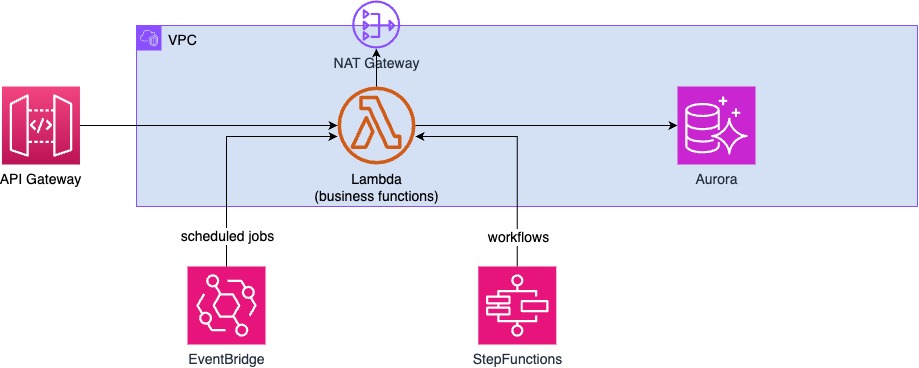
We use two more services to orchestrate some of the business logic. We use EventBridge to execute some jobs on a scheduled basis and Step Functions to orchestrate some workflows that involve interaction between several lambda functions.
In the last article of this series (Part 5: Coding and Deployment) we will talk more about internals of these lambda functions. For now it is just relevant to say that all functions are written in Python and are using SnapStart to reduce cold start to the minimum.
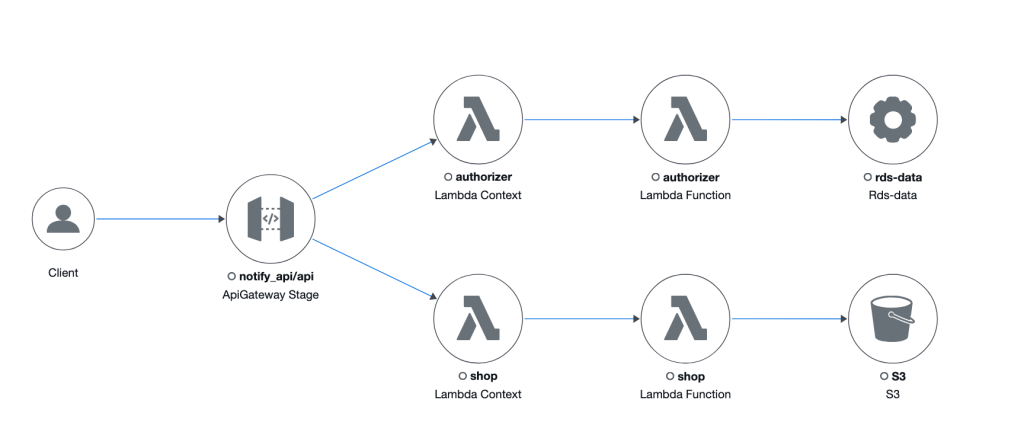
As an example, let’s look at the Trace Map for one request. In this case it as a call to a Shop, to list all the shop items.
Such request comes from a Client (browser or a mobile app), comes to the API Gateway which first calls “authorizer” lambda function to check if the user is allowed to make such a request. If yes, the request is then forwarded to the “shop” lambda function to do the rest.
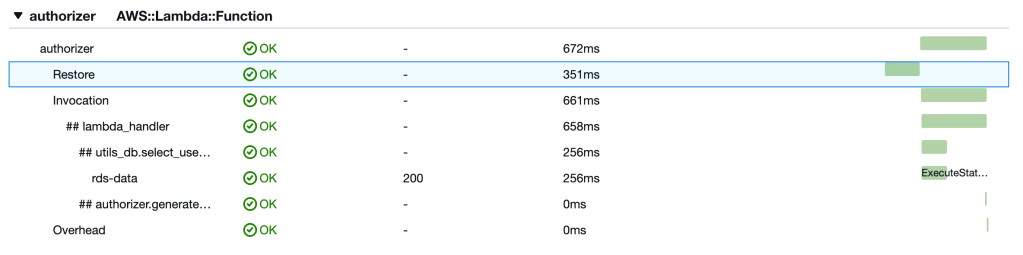
In the X-Ray traces, we can see that there is a Restore segment which refers to the time it takes for Lambda to resume a pre-initialized environment from a snapshot, rather than starting a function completely from scratch. Basically we have a cold start of 351ms here.
Integrations
The final part of our architecture is the integration with other systems and services.
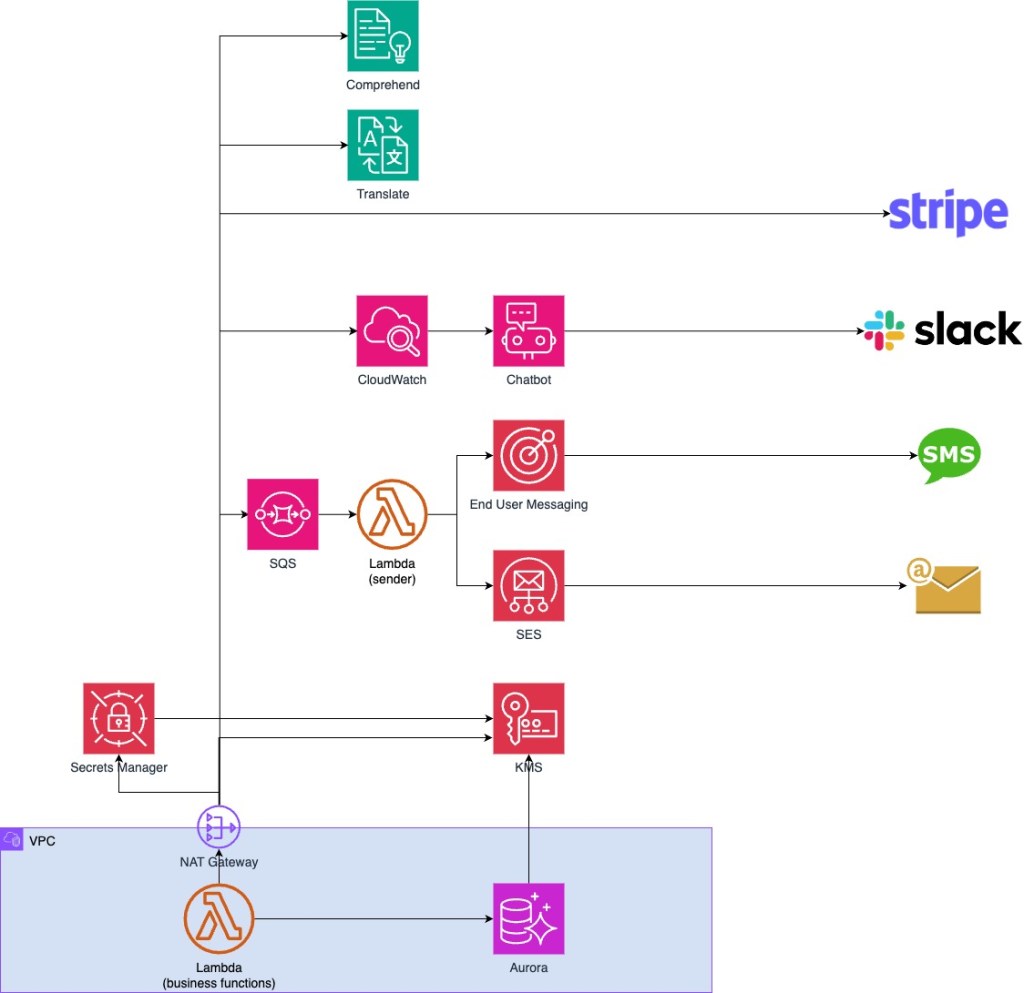
Let’s examine each of those:
- Comprehend and Translate
Comprehend and Translate are used for real-time translation of the tag description. Let’s see it in an example.
If someone finds my wallet, they see a tag (QR code) the can scan with a mobile phone camera.

That will take them to a screen that shows description for my wallet:
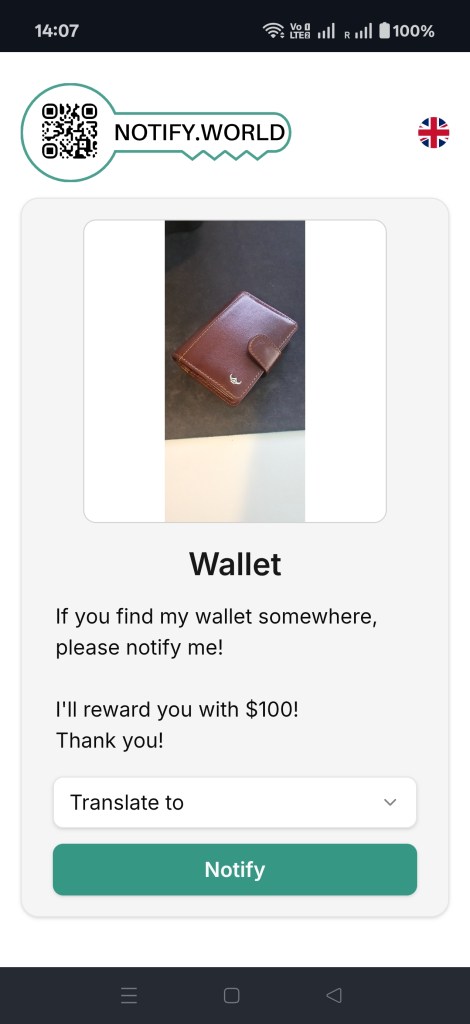
On this screen, we run the Comprehend service on the description text. Comprehend has ability to recognize the language of the text. If Comprehend is more than 95% certain that it recognized the source language, then we show the Translate to dropdown. Otherwise we don’t show it as we are not certain what the source language is.
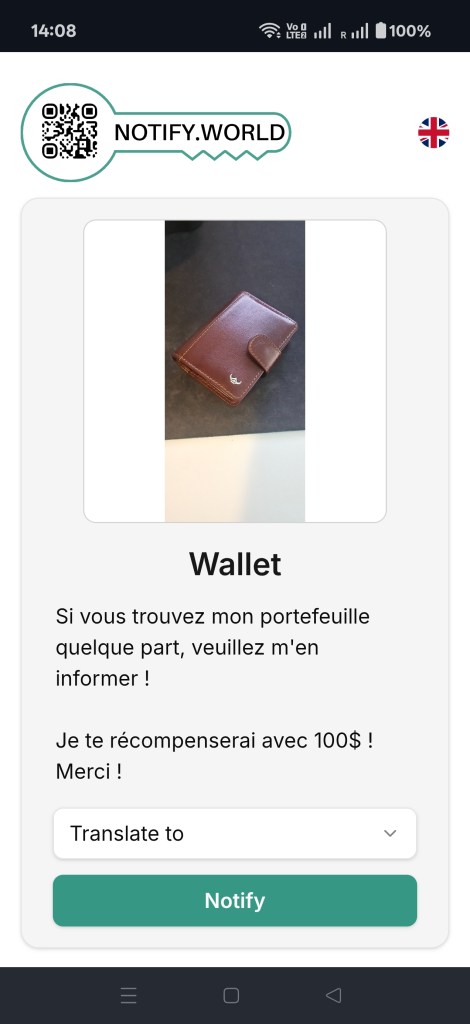
If anyone doesn’t understand English, they can click on the Translate to drop down and select a language they understand:
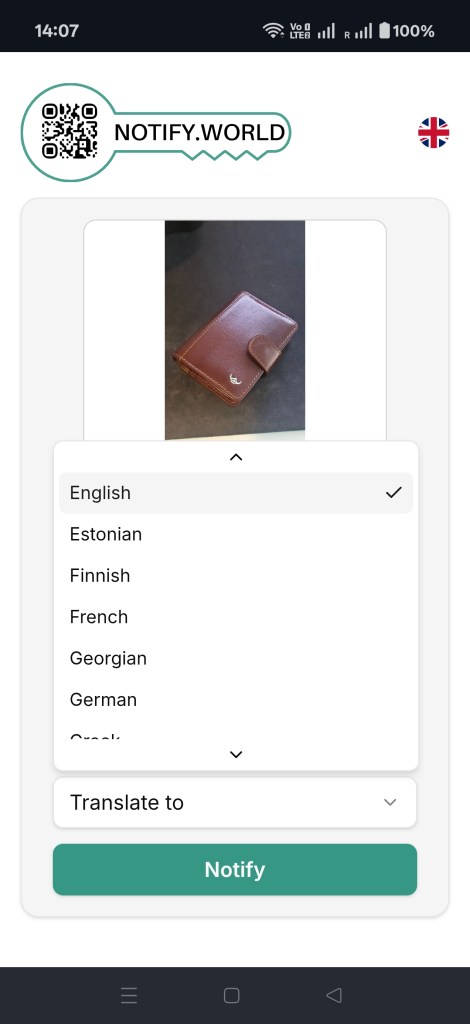
In that moment, a translate service will translate the description text from the source to the destination language and display it:
- Stripe
We integrate Stripe for all subscriptions and Shop payments.
- Slack
In case of any errors in our business logic, there is an integration between CloudWatch and Slack. We use AWS ChatBot for that integration. We have a channel in Slack where all errors are received so however is available can quickly react.
- SMS/Email
Notifications are major part of the NotifyWorld. That’s how NotifyWorld communicates with users. If a QR code is scanned, a user receives Email and/or SMS. Plenty of other notification types are sent to users’ emails and SMSs.
That is why we need to use SQS queue to collect all the messages and then to process them one by one.
- Secrets Manager
Important tokens such as cloudflare_secret_key, stripe_secret_api_key and aurora-db-credentials are kept in secrets manager.
- KMS
Here we have several keys for database and object storage encryption.
Conclusion
This was a brief overview of the NotifyWorld solution architecture. We will dive into more details in the following articles that will focus on the code, deployment and security implementation.
Till then, go and register on Notify World (https://notify.world) and see it for yourself how it works…


